If you are self-employed (OSVČ) in the Czech Republic, you can check your social tax payments, monthly deposits, outstanding debts, and late-payment interest online using the Czech Social Security Administration (ČSSZ) portal.
The portal shows how much you are supposed to pay each month, how much the social tax office has received, and which payments are still missing.
How to check your social tax payments online
You can log in to the ČSSZ portal using your Business Czech Data Box (datová schránka) or another supported electronic identification method.
Open the ČSSZ ePortal.
Click Přihlásit se (Log in).
Choose Datovou schránkou if you want to login via your Data Box.
Open Online služby (Online services).
Select Pro OSVČ (For self-employed people).
Find Informace o zaplacených zálohách na důchodové pojištění OSVČ.
Open the service and select the year you want to check on dropdown.
You can also open the social tax payment overview directly.
How to read your payment records
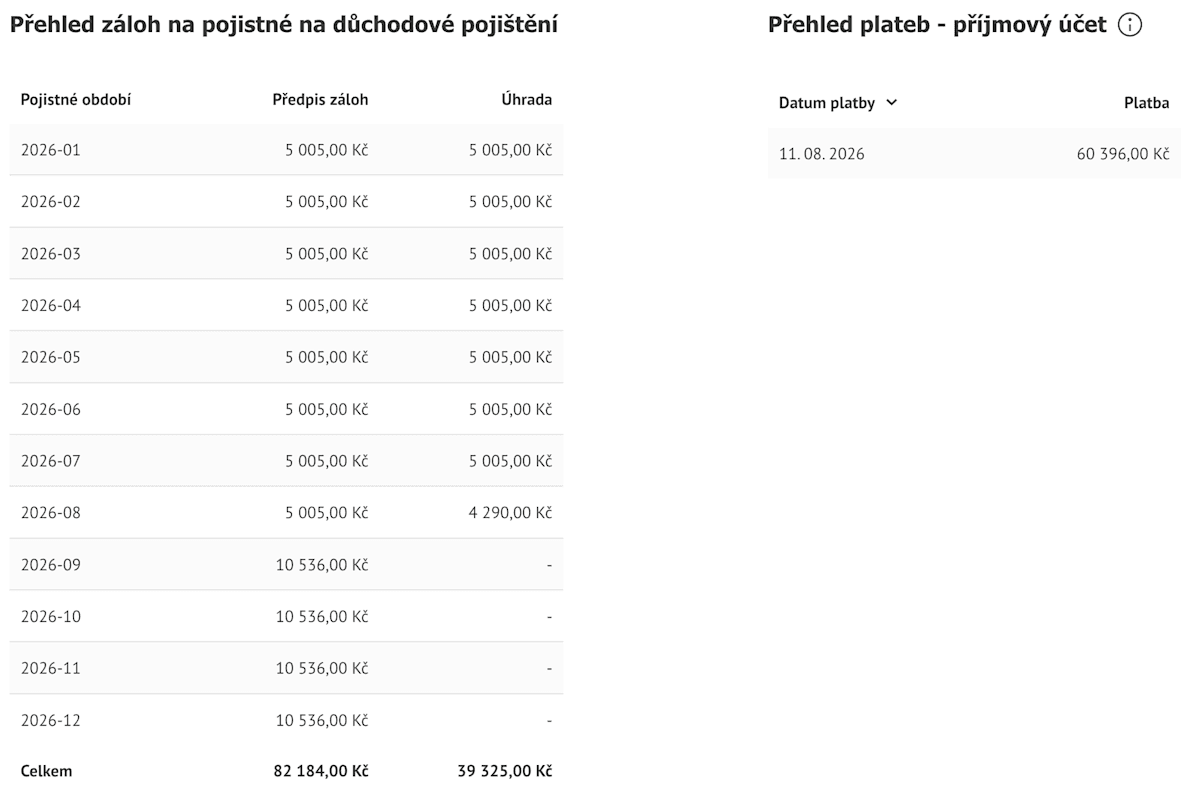
The ČSSZ payment overview has two tables. The left table shows your required monthly social tax deposits and how much has been credited to each month. The right table shows the bank transfers received by the social tax office.
Left table: Přehled záloh na pojistné na důchodové pojištění
Pojistné období (Insurance period): The month for which your social tax deposit is required.
Předpis záloh (Required monthly deposit): The amount you are supposed to pay for that month.
Úhrada (Payment credited): The amount the social tax office has allocated to that month’s deposit. This is not necessarily the amount you transferred that month.
Celkem (Total): The total required deposits and payments credited for the selected year.
Right table: Přehled plateb – příjmový účet
Datum platby (Payment date): The date the social tax office received your payment.
Platba (Payment amount): The amount received. If you made one large transfer covering several months, it appears here as one payment.
What do the symbols mean?
The ČSSZ overview also uses special symbols:
-1: You are not required to pay a monthly deposit because you received sickness insurance support for the entire month.
––: You were not performing self-employment activity during that month.
XXXX: The social tax office does not know your required monthly deposit amount. For example, this happens if your annual social tax report declaration is overdue and the office has not received the information needed to calculate and set your monthly deposits.
Example from a real social tax payment record
In the screenshot above, the client’s required monthly social tax deposit was 5,005 CZK from January to August 2026. It increased to 10,536 CZK in September, based on the income reported for 2025 in August.
However, the client also had unpaid social tax from 2025:
9,518 CZK in unpaid monthly deposits.
11,553 CZK in outstanding annual social tax after submitting the 2025 social tax report.
On 11.08.2026, the client made a single payment of 60,396 CZK, shown in the payment history on the right.
Instead of allocating the entire payment to the current monthly deposits, the social tax office used it to cover older outstanding balances first.
The payment was allocated to:
Unpaid monthly deposits from 2025.
The outstanding annual social tax balance for 2025.
Monthly deposits of 5,005 CZK from January to July 2026.
Part of the August 2026 deposit, with 4,290 CZK credited to that month.
This explains why your monthly deposits can appear unpaid even when you have recently transferred a large amount.
If you have outstanding social tax from previous years, the social tax office can allocate your payments to those older debts first.
As a result, you can continue making regular monthly payments but still see unpaid deposits in your current year’s overview.
This is why you should check both tables. The payment history shows how much the social tax office received, while the monthly deposit overview shows which months those payments covered.
How to check if you owe social tax
The ČSSZ portal has a separate service for checking your outstanding social tax, late-payment interest, and fines.
After logging in, open Stav pohledávek na pojistném, penále a pokutách OSVČ.
You can also access the social tax debt overview directly.
The overview shows your outstanding social tax, late-payment interest (penále), and fines separately.
Why your final social tax balance can be higher than the amount on your declaration
When you or your accountant prepare your annual social tax report, your total social tax is calculated based on your business income.
The monthly deposits you already paid for that year are deducted to calculate your remaining balance.
This is where mistakes happen.
For example, your total social tax for last year is 100,000 CZK, and you transferred 80,000 CZK in monthly deposits during that year.
You deduct 80,000 CZK from your total social tax and calculate a remaining balance of 20,000 CZK, which you pay after submitting your annual report.
However, you also had an unpaid social tax balance of 20,000 CZK from a previous year. The social tax office used part of your monthly payments to cover that older debt.
As a result, only 60,000 CZK was credited toward last year’s social tax.
Your actual remaining balance was:
100,000 − 60,000 = 40,000 CZK
You already paid 20,000 CZK, so another 20,000 CZK remains unpaid.
You continue paying your new monthly deposits regularly. Later, when checking your ČSSZ account, you discover that some of those deposits have not been fully credited and you still have outstanding debt.
The reason is that you paid 20,000 CZK less than the actual balance for the previous year. The social tax office used part of your subsequent payments to cover that outstanding amount, leaving some of your current monthly deposits unpaid.
This is why checking your bank transfers is not enough. Before entering your paid deposits in the annual social tax report, check how much ČSSZ has actually credited to that year.
Otherwise, you can submit your report using incorrect payment amounts, pay the balance you calculated, and later discover that you still owe social tax.
At Pexpats, we check social tax and health insurance payment records before preparing annual reports and review the balances again after filing. This helps us identify older debts, incorrect payment amounts, and differences between bank transfers and payments credited by the authorities.
Why Pexpats checks your social tax payments before and after your tax declaration
From our experience preparing tax declarations for freelancers in the Czech Republic, clients often don’t know exactly how much they have paid in social tax and health insurance.
Some of them confuse these payments with income tax advances or provide amounts that don’t match the official payment records.
Another common mistake is including a one-time payment of the previous year’s outstanding social tax balance in the total monthly deposits, resulting in an incorrect deduction.

This is why Pexpats includes social tax and health insurance payment audits as part of our tax declaration service.
Before preparing your tax declaration and annual reports, we check your payment records directly with the social tax office and your health insurance company.
This helps us confirm how much you have already paid so we deduct the correct deposits from your final social tax and health insurance amounts, calculated based on your previous year’s income.
After submitting your tax declaration and annual reports, we check the records again to confirm your updated balances, new monthly deposits, and any outstanding payments.
We also explain the results so you understand how much you have paid, how much you still owe, and why your monthly deposits have changed.
These audit checks are important regardless of who prepares your tax declaration. You can file it yourself, hire an accountant, or use Pexpats.
If you are not sure about your social tax or health insurance deposit payments, or don’t understand an outstanding balance, contact Pexpats.
We can review your payment records and help you understand where the debt comes from.
How does the social tax office calculate your monthly deposits?
Your new monthly social tax deposits are calculated based on your income reported for the previous year.
After submitting your annual social tax report (Přehled o příjmech a výdajích OSVČ), the social tax office calculates your final social tax and sets your new monthly deposits, assuming you will earn approximately the same average monthly income as last year.
One detail that often causes confusion is the number of months you were self-employed during the previous year.
The social tax office does not automatically divide your annual tax base by 12 months. It uses the number of months of self-employment activity reported on your annual social tax form.
We have seen this difference when reviewing clients’ social tax reports, especially when their trade licenses were not active for the entire previous tax year.
Example 1: Your trade license was active for 10 months
The client had an annual gross income of 1,327,863 CZK. After deducting 60% in business expenses (796,718 CZK), the annual tax base was 531,145 CZK.
The social tax assessment base is 55% of the annual tax base, and the social insurance rate is 29.2%.
The annual social tax calculation was:
531,145 × 55% × 29.2% = 85,302 CZK
However, the client was self-employed for 10 months, not 12.
The social tax office therefore calculated the average monthly tax base using 10 months:
531,145 ÷ 10 = 53,114.50 CZK
The new monthly deposit was calculated as follows:
53,114.50 × 55% × 29.2% = 8,530.19 CZK
After rounding up, the new monthly deposit was 8,531 CZK.
If you divide the same annual tax base by 12 months, the average monthly tax base is only 44,262.08 CZK.
That gives a lower monthly deposit, but it does not reflect the 10 months reported on the client’s social tax form.
Example 2: Your trade license was active for only two months
In another client case, the trade license was activated in November last year.
The business was active for November and December, and the annual tax base after deducting expenses was 131,200 CZK.
The annual social tax calculation was:
131,200 × 55% × 29.2% = 21,071 CZK
However, the client was self-employed for only two months.
The average monthly tax base was:
131,200 ÷ 2 = 65,600 CZK
The new monthly deposit was calculated as follows:
65,600 × 55% × 29.2% = 10,535.36 CZK
After rounding up, the new monthly deposit was 10,536 CZK.
The client was surprised by the amount because the business had been active for only two months.
The explanation is that the social tax office uses the average monthly tax base from the previous year to calculate the new deposits.
The client earned 131,200 CZK in taxable business income during two months, so the average monthly tax base was relatively high.
Why does the number of months make such a difference?
To understand the difference, let’s use the same annual tax base of 531,145 CZK and compare three periods of self-employment: 12 months, 10 months, and 2 months.
Monthly Social Tax Deposits: 12 vs. 10 vs. 2 Months
Calculation | 12 months | 10 months | 2 months |
|---|---|---|---|
Annual tax base | 531,145 CZK | 531,145 CZK | 531,145 CZK |
Months of self-employment | 12 | 10 | 2 |
Average monthly tax base | 44,262.08 CZK | 53,114.50 CZK | 265,572.50 CZK |
Annual social tax (55% × 29.2%) | 85,302 CZK | 85,302 CZK | 85,302 CZK |
Calculated new monthly deposit | 7,109 CZK | 8,531 CZK | 42,651 CZK |
The annual tax base and calculated annual social tax remain the same in all three examples.
However, your monthly deposit changes significantly depending on how many months you were self-employed.
If you earned 531,145 CZK in taxable business income during 12 months, your calculated monthly deposit is 7,109 CZK.
If you earned the same amount during only two months, your calculated monthly deposit increases to 42,651 CZK.
The difference comes from the number of months, not from a higher annual social tax.
What if your income decreases this year?
Your monthly social tax and health insurance deposits are based on your previous year’s income.
If you earned a high income last year or were self-employed for only a few months, your new monthly deposits can be much higher than you can afford this year.
If your business income and average monthly income have significantly decreased, you can apply to the social tax office (ČSSZ) and your health insurance company to reduce your monthly deposits.
You need to explain the reason for requesting a reduction, such as a decrease in your business income this year.
Do not simply stop paying or reduce your deposits yourself. Until your application is approved, continue paying the current monthly amount.
A reduction changes your monthly advance payments, not your final annual social tax or health insurance contributions.
Your final amounts are calculated based on your actual income for the current year when you prepare your annual social tax and health insurance reports next year.
What else should you know about social tax payments?
Here are a few important things to remember when checking your social tax payments and outstanding balances:
Monthly deposit changes: Your new monthly deposits do not start in January. They change after you submit your annual social tax report, based on your average monthly tax base from the previous year.
Monthly payment deadline: Social tax deposits are due between the first and last day of the current month.
Annual social tax balance: After deducting the total monthly deposits credited to the previous year, you must pay any remaining annual social tax within eight days after submitting your annual report.
Overpayments: If your deposits exceed your final annual social tax, you have an overpayment. Outstanding debts can affect the amount of refund.
Late-payment interest: Missing or late payments create additional interest (penále), which also appears in your ČSSZ debt overview.
Payment instructions: You can find the bank account and variable symbol in the ČSSZ portal. Click “Platební údaje pro celkovou platbu” to generate a QR code for paying your total outstanding debt.
Incorrect payment records: If your bank transfers do not match the amounts credited to your social tax account, contact social tax office (OSSZ) to check how your payments were recorded and registered.